- Go 100%
| assets | ||
| examples | ||
| hardware | ||
| tutorial | ||
| .gitignore | ||
| BUILD.md | ||
| LICENSE | ||
| README.md | ||
| TUTORIAL.md | ||

NiceBadge
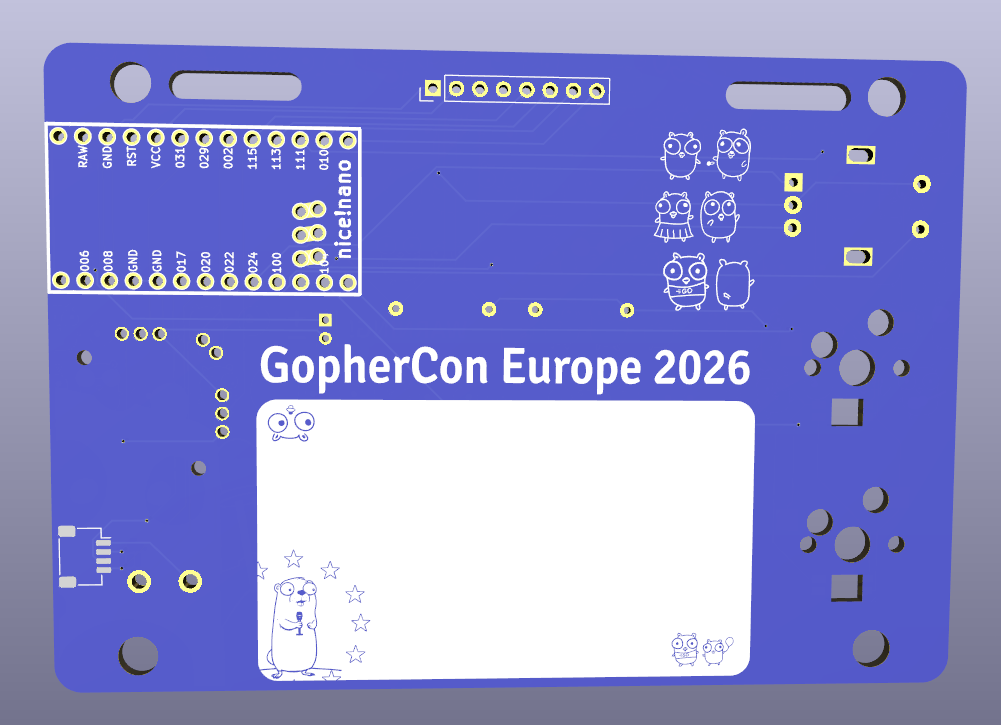
NiceBadge is an electronic conference badge and a hands-on platform for learning TinyGo programming.
Whether you are attending a conference or just getting started with embedded development, NiceBadge gives you a real piece of hardware to hack on, complete with a ready-to-use firmware, step-by-step tutorials, and progressively more advanced examples that unlock every capability of the board.
Features
| Peripheral | Details |
|---|---|
| Color display | Compact full-color screen (FJ08K-S), ST7789 driver |
| Buttons | 2 Cherry MX hot-swap mechanical switches |
| Joystick | Alps EC11E rotary encoder with push switch |
| RGB LEDs | 2 × SK6812MINI-E addressable LEDs, WS2812 driver |
| StemmQT connector | JST SH 4-pin for I2C expansion modules |
| Buzzer | 5.5 mm passive buzzer for audio feedback |
| Bluetooth | BLE via the nRF52840 on the nice!nano |
| USB HID | Acts as a keyboard/mouse over USB thanks to the nice!nano |
| Battery | Onboard battery cell header (2-pin 2.00 mm) |
The microcontroller is the nice!nano (nRF52840), which is fully supported by TinyGo and exposes both USB HID and Bluetooth HID out of the box.
Repository layout
nicebadge/
├── hardware/              # KiCad PCB design files
│   └── PCB-kicad/
│       └── production/    # Gerbers, BOM, pick-and-place files
└── tutorial/              # TinyGo tutorials and examples
    ├── basics/            # Step-by-step basics (step0 → step10)
    ├── ble/               # Bluetooth Low Energy examples
    └── examples/          # Standalone examples (sensors, HID, etc.)
Firmware
NiceBadge ships two ready-to-use firmwares:
Demo firmware (conference)
A showcase firmware that demonstrates all badge peripherals — LEDs, display, buttons, joystick, buzzer, and BLE. Ideal for conferences and as a starting point for your own experiments.
Repository: code.madriguera.me/GoEducation/badges
HID firmware
Turns the badge into a fully functional USB/Bluetooth keyboard. Built on top of sago35/keyboards, a TinyGo framework for custom keyboards.
Repository: github.com/sago35/keyboards
Getting started
Prerequisites
- TinyGo ≥ 0.32
- Go ≥ 1.22
- A NiceBadge board (see hardware section below) or a compatible nice!nano dev board
Hardware
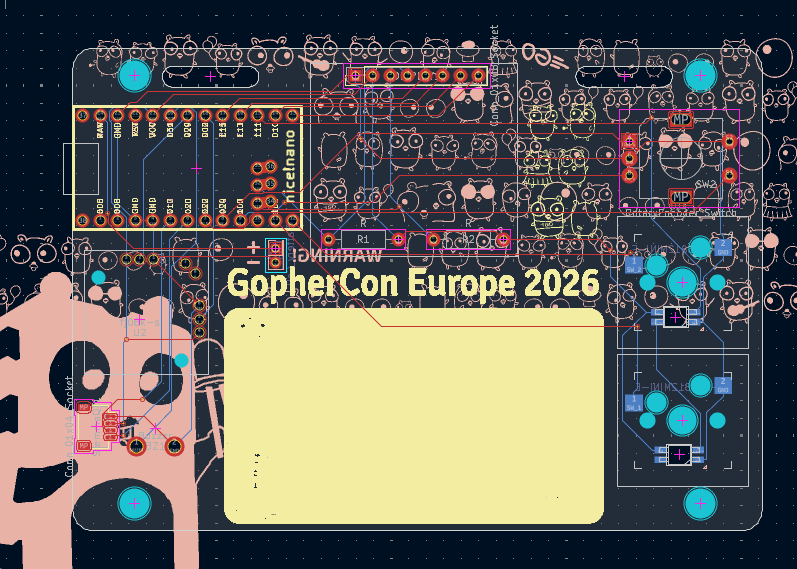
All design files are located in hardware/PCB-kicad/. Production files (Gerbers, BOM, positions) ready for fabrication are in hardware/PCB-kicad/production/.
Bill of Materials
| Designator | Value / Part | Footprint | Qty |
|---|---|---|---|
| BT1 | Battery Cell | PinHeader 2×01 P2.00 mm Vertical | 1 |
| BZ1 | Buzzer | Buzzer 5.5 mm | 1 |
| DISPLAY1 | Display connector | PinHeader 1×08 P2.54 mm Vertical | 1 |
| H1, H2, H3, H4 | Mounting Hole | M2 | 4 |
| LED1, LED2 | YS-SK6812MINI-E | SK6812MINI-E | 2 |
| R1, R2 | Resistor | Axial DIN0207 L6.3 mm D2.5 mm P10.16 mm | 2 |
| STEMMAQT1 | StemmQT connector | JST SH SM04B-SRSS-TB 1×04 P1.00 mm | 1 |
| SW1, SW2B1 | Push switch | Cherry MX Hot-swap | 2 |
| SW2 | Rotary Encoder + Switch | Alps EC11E Vertical H20 mm | 1 |
| SW2B, SW2C | Key switch | Strap hole | 2 |
| U1 | nice!nano | nice_nano | 1 |
| U2 | FJ08K-S | FJ08K-S | 1 |
Tutorials & examples
All code lives under tutorial/. Flash any step from inside that directory:
cd tutorial
tinygo flash -target nicenano ./basics/step0
Run go mod tidy once inside tutorial/ to fetch all dependencies.
Basics
A progressive series that introduces every peripheral one at a time.
| Step | What it does |
|---|---|
| step0 | Blink the built-in LED — verifies the flash toolchain works |
| step1 | Built-in LED controlled by button A |
| step2 | WS2812 RGB LEDs alternating red and green |
| step3 | WS2812 LEDs change color with buttons A, B, and rotary |
| step3b | Rainbow cycle on the LEDs, A/B scroll through the hue |
| step4 | "Hello Gophers!" text on the display |
| step5 | Display shows a circle per button; rings appear on press |
| step6 | Analog joystick — a dot follows the stick on the display |
| step7 | Rotary encoder — turning cycles LED colors, push resets |
| step8 | Passive buzzer plays a note per button press |
| step9 | Serial monitor — prints button, encoder, and joystick events over USB serial |
| step10 | USB MIDI — badge sends notes C4 / E4 / G4 to any DAW |
| step11 | USB HID mouse — joystick moves the cursor, A/B click |
BLE
Bluetooth Low Energy examples using the nRF52840 on the nice!nano. Compatible apps: nRF Connect, nRF Toolbox, Serial Bluetooth Terminal, LightBlue.
| Step | What it does |
|---|---|
| step1 | Counter — advertises as Nordic UART Service (NUS), sends an incrementing counter via BLE notifications every second; display shows connection status and current value; send reset from the app to restart the count |
| step2 | LED color control — mobile writes 3 bytes (R, G, B) to a custom characteristic; both WS2812 LEDs and the display update immediately |
| step3 | Scanner — lists nearby BLE devices with name and RSSI, color-coded by signal strength; button A clears the list |
Examples
Standalone, feature-complete programs.
| Example | What it does | Extra hardware |
|---|---|---|
| thermal-camera | AMG88xx 8×8 IR sensor upscaled with bilinear interpolation and rendered with an iron-palette color map on the full display | AMG88xx sensor on I2C1 (SDA=P0_17, SCL=P0_20) |
| rubber-duck | USB HID keyboard automation (Ubuntu/GNOME target): opens a text editor, types a message, and launches a URL. Press button A to trigger | — |
| co2-sensor | SCD4x CO2/temperature/humidity sensor: display background turns green/yellow/red by CO2 level, LEDs mirror the color, buzzer warns above 1500 ppm | SCD4x sensor on I2C1 (SDA=P0_17, SCL=P0_20) |
Acknowledgements
NiceBadge is based on the conf2025badge by sago35, which debuted at the TinyGo Conference in Japan. NiceBadge shares the same form-factor and was built on top of the groundwork たかさごさん laid there.
Thank you, for the inspiration, the open design, and all the work that made this possible.
License
See LICENSE.